Career Center Headshots: How to Offer Professional Photos to Students
Explore how university career centers can offer professional headshots through self-service booths, headshot days, and other delivery models, while improving accessibility, connecting the service to LinkedIn support, and measuring student usage and ROI.
Why should your career center install a professional headshot booth?
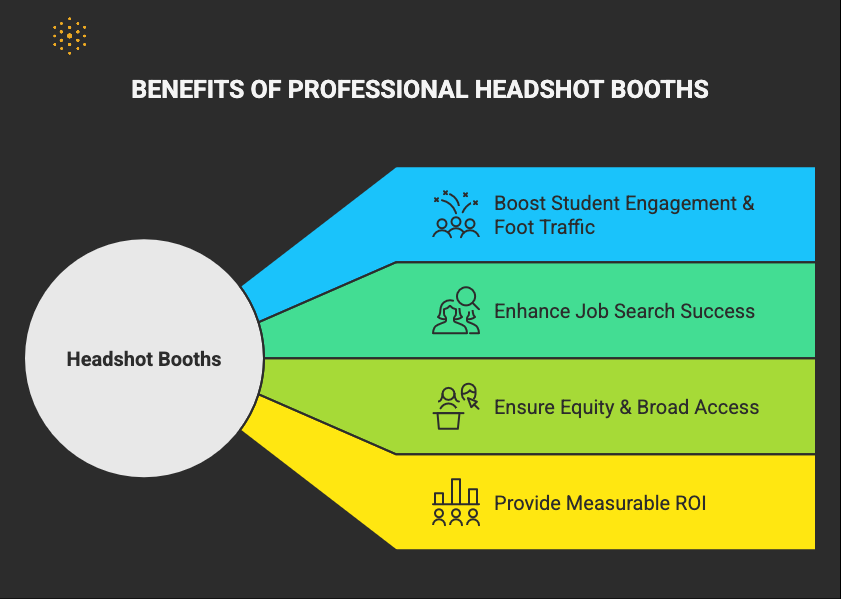
A headshot booth boosts student engagement, enhances placement outcomes, and promotes equity by offering free, high-quality photos for all students. It also delivers measurable ROI for career centers by driving foot traffic, supporting LinkedIn readiness, and showcasing tangible impact through usage data and analytics.
If your career center is considering professional headshots for students, the main decision is not simply whether to buy a photo booth. It is how to offer the service in a way that is accessible, easy to use, connected to career preparation, and worth the investment.
Career centers can provide headshots through several models, including a permanent self-service booth, recurring headshot days, campus photography partnerships, or sessions tied to career fairs and LinkedIn programming.
This guide breaks down why career center headshots can be useful, the different ways universities can offer them, how to set up a professional photo booth, and what your team should track once the service is live.
Career Center Headshots at a Glance
| Decision | What career centers should consider |
|---|---|
| Why offer professional headshots? | Give students accessible photos they can use across LinkedIn, portfolios, university profiles, and other appropriate professional contexts |
| How can you provide them? | Permanent self-service booth, recurring headshot days, campus photography partnership, or event-based sessions |
| Where should the service live? | Career center, library, student union, or another visible and accessible student space |
| What should you track? | Sessions, unique students served, repeat usage, cost per student, and referrals into other career services |
| What should happen after the photo? | Connect students to LinkedIn optimization, resume support, career coaching, networking, or employer preparation |
A permanent booth is not the only option. The right approach depends on student demand, available space, budget, staffing, and how frequently your career center wants to make professional headshots available.
Why Should Career Centers Offer Professional Headshots?
Career centers should offer professional headshots because they give students accessible, career-ready photos for LinkedIn and other professional profiles while also creating a low-barrier entry point into broader career support. A headshot service can help career centers improve access, attract students who may not otherwise engage, and connect a simple student need with services such as LinkedIn reviews, resume support, networking guidance, and career coaching.
A self-serve headshot booth acts as a powerful gateway service, drawing students into the career center. Once there, they can be introduced to the wealth of other resources available.
Georgia State University for instance, experienced a remarkable surge, with over 5,000 photo sessions in just one academic year.
Headshots became their #1 booked career center service, surpassing the engagement of even resume workshops or mock interviews.
Similarly, University of Maryland leveraged a grant and student government funding to provide their Iris Air booth in the library, making it free and accessible to students and alumni.
How Can Career Center Headshots Support Students' Professional Presence?
A professional headshot gives students one more way to present a complete and consistent professional identity online, particularly on platforms such as LinkedIn.
LinkedIn has reported substantial differences in profile visibility between members with and without profile photos:
- Members with a photo receive up to 21 times more profile views
- And up to 36 times more messages compared to those without a photo.
For career centers, the larger opportunity is to make the headshot part of a broader LinkedIn profile intervention rather than treating it as an isolated service.
A student who receives a new headshot can also be prompted to review their LinkedIn headline, About section, experience, skills, and networking activity.
Pro Tip: To boost booth usage, try tying headshots to LinkedIn workshops, hosting “Headshot Days” with snacks or giveaways, collaborating with student groups, and featuring the booth at career fairs or orientation events.
One simple sequence is:
Headshot → profile photo update → headline and About review → experience and skills check → networking or employer outreach
This turns a quick transactional service into an opportunity for deeper career preparation.
How Can Career Centers Make Professional Headshots More Accessible?
Career centers can make professional headshots more accessible by removing cost, appointment, location, and usability barriers. Offering free or low-friction access in a visible campus location, ensuring the setup is physically accessible, and allowing students to use the service independently can help more students benefit from professional headshots regardless of their financial resources or prior familiarity with career services.
Not every student has the financial means or opportunity to access professional photography studios. Photo booths level the playing field by providing:
- Free, high-quality headshots to all students, regardless of their socioeconomic background.
- Self-service privacy and comfort, which can significantly reduce anxiety for students who might feel self-conscious in a traditional studio setting.
- More inclusive participation, including those from underrepresented groups, ensuring everyone has the tools to succeed.
Accessibility should also shape how the service is designed. Before launch, career centers should consider whether students can use the service without an appointment, whether the space is wheelchair accessible, whether instructions are easy to follow independently, and whether students can retake photos privately until they are comfortable with the result.
This aligns with broader higher education goals of student success and inclusivity, ensuring all students have equitable access to resources that enhance their employability.
For instance, University of Texas at Dallas UT Dallas, supported by GM Financial, offers free professional photos, with a direct link for students to book appointments via Handshake.
How Should Career Centers Measure Headshot Booth Usage and ROI?
Career centers should measure headshot booth ROI using a mix of usage, reach, cost, and downstream engagement metrics. Total sessions show demand, while unique students served, usage by cohort, cost per student, and referrals into services such as LinkedIn reviews or career coaching provide a clearer picture of whether the booth is creating broader career-services value.
The data generated by photo booth usage can be invaluable for demonstrating the career center's impact and justifying ongoing investments.
Data from Georgia State University helped them demonstrate career center value:
- Headshot sessions outpaced all other services
- Foot traffic increased
- Year-over-year usage rose
- Each visit unlocked coaching opportunities
Career centers do not need to rely on total booth sessions alone. A stronger measurement set can show who the service reaches, what it costs, and whether it leads students into broader career support.
| Metric | What it helps you understand |
|---|---|
| Total headshot sessions | Overall demand for the service |
| Unique students served | Actual student reach |
| Usage by class year or cohort | Which student groups are using or missing the service |
| Repeat usage | Whether students return for updated photos |
| Peak usage periods | When demand is highest |
| Cost per student served | Basic investment efficiency |
| Referrals into other career services | Whether the booth creates deeper engagement |
| LinkedIn workshop or profile-review participation | Whether headshots lead into broader professional-profile support |
Used together, these measures give career center leaders a clearer picture of whether the service is expanding access, generating sustained student demand, and creating useful pathways into other career support.
What Are the Best Ways to Offer Career Center Headshots?
Career centers can offer professional headshots through several models: a permanent self-service booth, recurring headshot days, partnerships with campus photographers, event-based sessions, or headshots integrated into LinkedIn programming. The right model depends on student demand, available budget and space, staffing capacity, and whether the goal is year-round access or periodic high-engagement programming.
| Headshot model | Best suited for | Main consideration |
|---|---|---|
| Permanent self-service booth | High-volume, year-round student access | Upfront investment, space, and maintenance |
| Recurring headshot days | Career centers testing demand or operating with smaller budgets | Requires repeated scheduling and promotion |
| Campus photographer partnership | Universities with existing photography or communications resources | Depends on internal capacity and availability |
| Career fair or event headshots | Creating a visible service around major career events | Access is limited to specific dates |
| LinkedIn workshop + headshot session | Connecting professional photos directly to profile development | Requires coordination between programming and photography |
The best approach depends on how frequently students need the service and what the career center wants the headshot experience to accomplish.
Some institutions may start with scheduled events and move to a permanent booth once demand is established.
How Should Career Centers Set Up a Professional Headshot Booth?
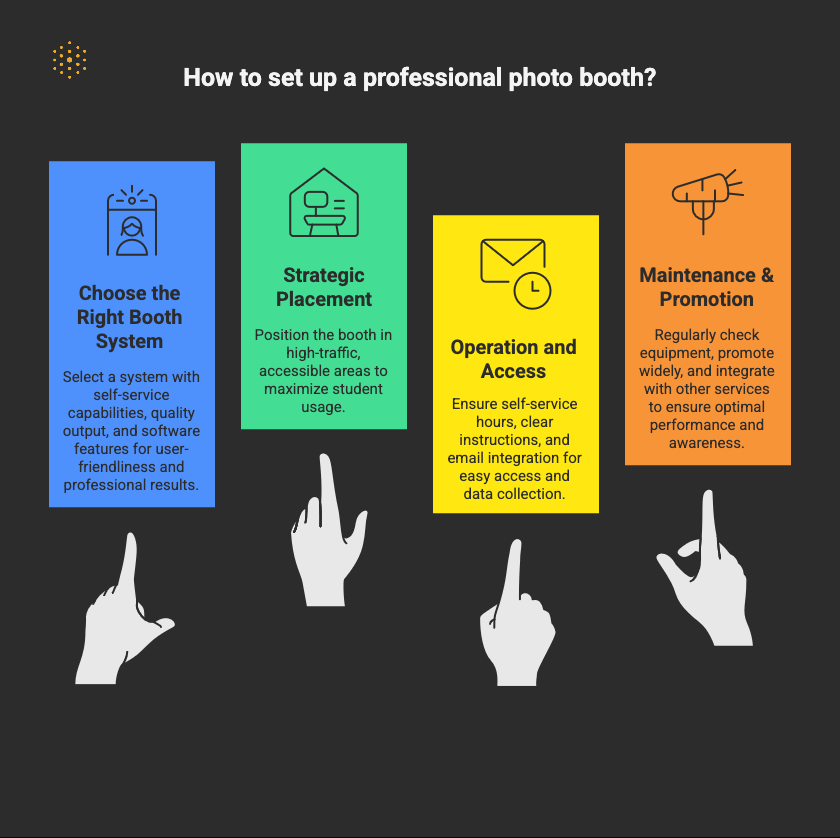
Career centers should set up a professional headshot booth around five practical decisions: the booth system, campus location, student accessibility, operating process, and ongoing promotion and maintenance. The strongest setups make the service easy to use independently, place it where students can access it conveniently, and connect booth usage to broader career preparation.
Choose the Right Booth System
- Self-Service Focus: Opt for systems designed for user-friendliness, allowing students to take and edit their photos independently. Companies like Iris Booth are widely adopted by universities for their self-serve capabilities, often featuring touchscreens or QR code controls for a touchless experience.
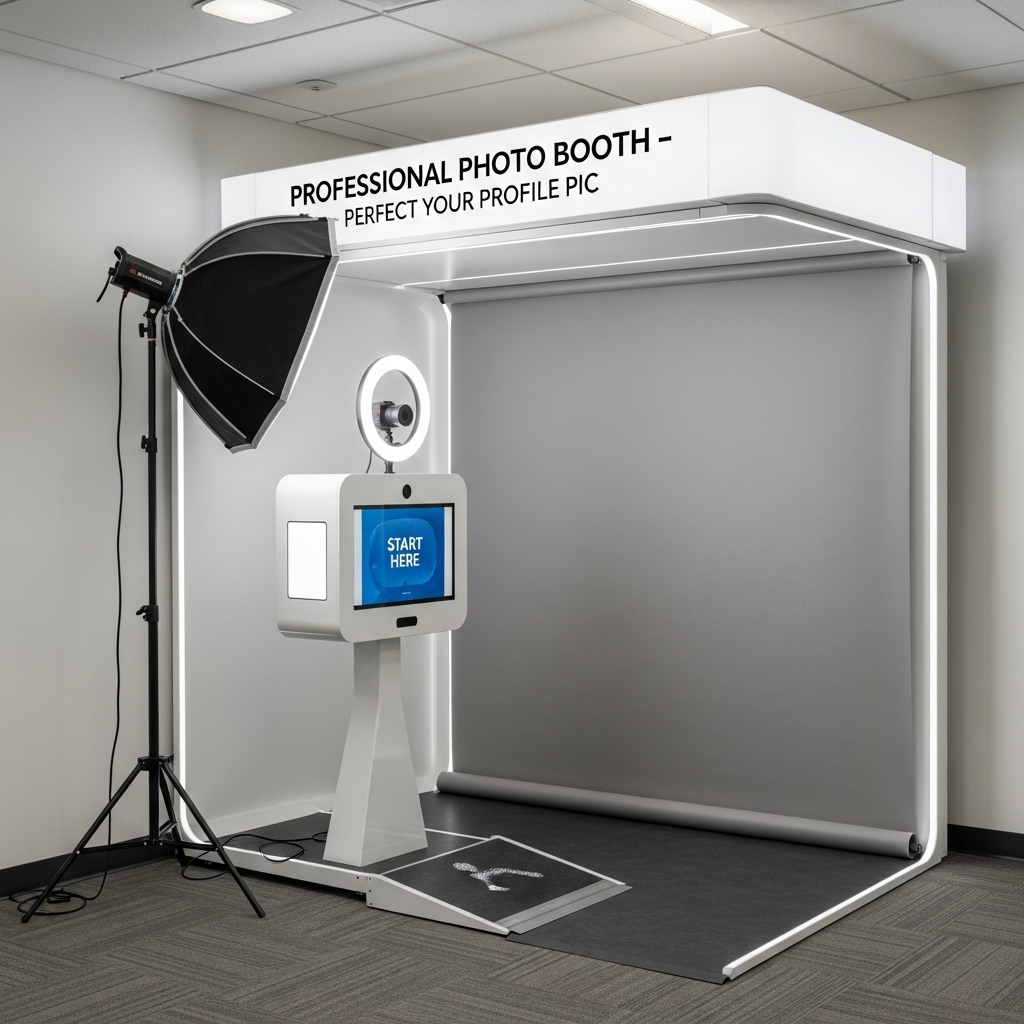
- Quality Output: Ensure the system offers professional-grade lighting (e.g., ring lights), a neutral backdrop (often white or grey for versatility), and a high-resolution camera for crisp, clear images.
- Software Features: Look for integrated software that provides basic editing tools (cropping, teeth whitening, blemish removal, filters) and easy digital delivery via email or cloud storage. Many systems also offer a tutorial for users.
Strategic Placement
- High-Traffic Areas: Position the booth in a visible, easily accessible location within the career center, library, or other student-frequented areas. University of Maryland placed their booth in the library, making it highly accessible.
- Accessibility: Ensure the booth is wheelchair accessible and designed to accommodate all students. NC State University explicitly mentions their Iris professional photo booth is wheelchair accessible.
Operation and Access
- Self-Service Hours: Maximize availability by allowing drop-in, self-service access during career center hours, and potentially extended hours if feasible. Many universities, like UC Irvine and Texas Tech University, offer drop-in access with no appointment needed for individual sessions.
- Clear Instructions: Provide clear, concise instructions on how to use the booth, including attire suggestions (business professional or business casual is typically recommended), posing tips, and photo retrieval steps. The University of Tennessee, Knoxville emphasizes that a staff member or Peer Career Advisor can assist, but the booth is also simple enough for self-use.
- Email Integration: Ensure the system seamlessly emails photos directly to the student's university email address (or preferred email) for easy download and use. This also allows for data collection on usage if desired.
Maintenance & Promotion
- Regular Checks: Periodically check the equipment to ensure it's functioning correctly, the backdrop is clean, and lighting is optimal. Have a clear protocol for technical issues, whether it's an internal IT team or vendor support.
- Promote Widely: Announce the photo booth's availability through campus emails, social media, career fair promotions, and during orientation sessions.
- Integrate with Career Services: Build a clear next step into the headshot experience. Students can be directed toward LinkedIn reviews, resume support, mock interviews, networking guidance, or career coaching depending on where they are in their career preparation.
- Usage Policies: Establish clear usage rules, emphasizing that the booth is for professional headshots only and detailing appropriate use, as outlined by UC Irvine and University of Tennessee, Knoxville.
Should Students Put Their Professional Headshot on Their Resume?
For most U.S. job applications, students should use professional headshots on LinkedIn, portfolios, university profiles, and other appropriate digital professional contexts rather than placing the photo on a standard resume.
Unless a specific role or application requests a photograph, keeping the resume focused on the student's qualifications, experience, skills, and accomplishments is generally the stronger approach.
Career centers can make this distinction clear in booth instructions or follow-up resources so students understand both how to use their new headshot and where it may not belong.
Final Thoughts
A career center headshot program works best when the photo itself is only the starting point. Whether your institution chooses a permanent booth, scheduled headshot days, or another delivery model, the service should be easy to access, connected to broader career preparation, and measured against clear usage goals.
And for career centers looking to amplify this kind of impact, Hiration helps career centers extend this momentum beyond the booth itself by supporting the rest of the career readiness journey in one place.
With tools for career assessments, AI-powered resume optimization, interview simulation, and LinkedIn support, along with a dedicated counselor module for managing cohorts, workflows, and analytics, teams can deliver more personalized guidance without adding operational strain.
Because it is built within a secure, FERPA and SOC 2-compliant platform, career centers also get the structure and oversight needed to scale support responsibly.
For teams thinking beyond one-off services and toward a more connected student success model, that kind of infrastructure becomes increasingly important.
Career Center Headshot Booth — FAQ
Why are headshots important for students?
Professional headshots increase perceived competence by up to 76%, making them a critical part of a student’s job search toolkit. They improve recruiter impressions and boost visibility on LinkedIn and Handshake.
How can a headshot booth boost student engagement?
Photo booths attract students to the career center. For example, Georgia State University recorded over 5,000 photo sessions in one year—making headshots its #1 most-used service, even above resume reviews and mock interviews.
Does having a professional photo really affect job search outcomes?
Yes. LinkedIn data shows profiles with a photo get up to 21× more views and 36× more messages. A professional headshot helps students make stronger first impressions and improves recruiter engagement.
How does a photo booth promote equity and inclusion?
Many students can’t afford professional photography. A free, self-serve booth ensures all students—regardless of background—can access high-quality headshots in a private, comfortable, and accessible setting.
What kind of ROI can a career center expect from a headshot booth?
Universities report major increases in foot traffic, service usage, and measurable engagement. Georgia State used booth data to demonstrate career center impact and justify funding through tangible metrics.
What equipment and setup work best for a headshot booth?
Opt for a self-serve, professional system like Iris Booth with studio lighting, a neutral backdrop, and built-in editing software. Ensure accessibility, clear usage instructions, and automated email photo delivery.
Where should the booth be located for maximum usage?
High-traffic areas such as libraries or student centers work best. The University of Maryland placed its booth in the library, making it free and accessible to both students and alumni, driving high engagement.
How can career centers promote the headshot booth?
Promote through campus emails, social media, and “Headshot Days” with giveaways. Pair booth use with LinkedIn or resume workshops to increase participation and tie it to career readiness programming.
What maintenance and accessibility tips should be followed?
Perform regular lighting and backdrop checks, provide wheelchair accessibility, and ensure clear instructions. Designate an IT or vendor support plan for troubleshooting and data tracking if needed.